
← Browse tech deals
TECH DEAL COMPASS

Is More RAM Always Better? When 8GB Is Genuinely Enough

Tech reviewers and hardware enthusiasts often declare that '16GB of RAM is the absolute baseline in 2026—never buy 8GB!' But for millions of budget-conscious shoppers, students, and everyday users, this blanket advice triggers unnecessary anxiety and leads people to waste $150 to $250 on excess memory capacity they will literally never use. More RAM does not automatically make a laptop faster: if your applications only demand 5.5GB of RAM, having 16GB or 32GB makes your computer 0% faster. Here is the honest truth about how Windows 11 and macOS handle memory, why ultra-fast NVMe swap makes 8GB remarkably capable, the 4 specific scenarios where 8GB is genuinely plenty, and how to shop verified deals without overpaying.

The 60-Second Verdict: Is More RAM Always Better?

Tech forums, PC gaming communities, and YouTube reviewers repeat the same mantra: “16GB is the bare minimum in 2026—never buy an 8GB laptop!” If you are editing 4K video or playing modern AAA games, that advice is completely accurate.

However, for millions of everyday laptop buyers, it is fundamentally misleading. More RAM does not make a laptop faster. RAM is not an engine; it is a desk. If all your active work (12 browser tabs, Spotify, Word, and Zoom) takes up 5.8GB of space on an 8-foot desk, paying $150 to $250 extra for a 16-foot desk will make your laptop exactly 0.00% faster. Unused RAM sits completely idle doing nothing.

Thanks to modern PCIe Gen4 NVMe SSDs (which swap memory at 5,000 MB/s instead of the sluggish 80 MB/s of old spinning hard drives), real-time memory compression in Windows 11 and macOS, and automated browser tab sleeping, 8GB of RAM is genuinely enough for everyday home, office, and school computing.

The Desk Analogy: Why Unused RAM Never Speeds Up Your Computer

The most common myth about computer hardware is that RAM acts like horsepower: add more, and the car goes faster. Here is how computer memory actually operates:

⚙️ The CPU is the Engine

Your processor (Intel Core i5, AMD Ryzen 5, Apple M2/M3) determines how quickly calculations happen, how fast web pages render, and how responsive applications feel when you click. A faster CPU genuinely makes your laptop faster.

🗄️ RAM is Just the Desk Surface

RAM simply holds the open documents and active programs you are working on right now. As long as everything fits on the desk, having extra empty desk space has zero impact on your speed. You only slow down when your desk overflows and you have to shuffle papers into the filing cabinet (the SSD).

Why 8GB in 2026 Feels Light-Years Better Than 8GB in 2016

Ten years ago, running out of RAM on an 8GB laptop meant a catastrophic system freeze. Why is the experience so dramatically different today? Three major engineering revolutions changed everything:

⚡ Ultra-Fast NVMe SSD Paging

Old mechanical hard drives swapped data at 80 MB/s, causing freezing hourglass spinners. Modern PCIe NVMe SSDs read and write at 3,500 to 7,000 MB/s. When Windows or macOS uses swap memory, transfers happen in milliseconds. Everyday users rarely notice a blip.

🗜️ Real-Time Memory Compression

Both Windows 11 (SysMain) and macOS automatically compress inactive background memory pages by up to 50% in real time using dedicated CPU hardware instructions before ever touching the disk.

💤 Smart Browser Tab Sleeping

Chrome, Edge, and Safari now feature built-in “Memory Saver” algorithms that automatically hibernate tabs you haven't clicked on in 15 minutes. Even with 40 tabs open, only the 3 or 4 active tabs consume RAM.

The 4 Specific Scenarios Where 8GB Is Genuinely Plenty

If your daily computing falls into any of these four common categories, buying an 8GB laptop is not just acceptable—it is often the smartest financial decision you can make:

1. Dedicated High School, College & General Study Laptops

Writing research papers in Google Docs or Microsoft Word, participating in Zoom or Microsoft Teams lectures, reviewing lecture slides in PowerPoint, browsing Canvas or Blackboard, and listening to Spotify in the background. Typical memory consumption: 4.8GB to 6.2GB. A modern 8GB machine handles this without breaking a sweat.

Verdict: 8GB is completely sufficient. Save the $150 premium for textbooks or software subscriptions.

2. The Household Everyday, Media & Secondary Travel Laptop

Streaming 4K Netflix or YouTube, web banking, filing taxes, managing family photos in Google Photos, reading emails, and ordering on Amazon. Typical memory consumption: 3.5GB to 5.0GB. More than 3GB of RAM sits completely idle at all times.

Verdict: Paying for 16GB yields zero perceptible benefit in daily responsiveness.

3. Chromebooks & Lightweight Operating Systems

ChromeOS idles at just 1.5GB of RAM (compared to ~3.5GB for Windows 11). On a Chromebook, 8GB leaves a massive 6.5GB of free headroom for web apps and Android apps. An 8GB Chromebook performs comparably to a 12GB Windows machine in tab-holding capacity.

Verdict: 8GB on a Chromebook or Linux machine is a powerhouse configuration.

4. Strict Budget-Capped Shoppers (Sub-$500)

On a strict $350–$500 budget, hardware is all about tradeoffs. An 8GB laptop in this price range can include a modern 6-core Ryzen 5 or Core i5 processor, a crisp 1080p IPS screen, and a fast 512GB NVMe SSD. To sell a 16GB laptop under $450, manufacturers almost always downgrade the screen to a terrible, washed-out 720p TN panel or use an ancient dual-core processor. A fast CPU + great screen + 8GB RAM is infinitely more enjoyable than a terrible screen + sluggish CPU + 16GB RAM!

Verdict: Prioritize screen and CPU quality over excess RAM on a budget.

When 8GB Is NOT Enough (The Real Red Lines)

To be completely fair, 8GB does have hard physical limits. You must upgrade to 16GB or 32GB if your routine computing crosses into any of these areas:

Workload Memory Reality Matrix: 8GB vs 16GB vs 32GB

Workload / Use CaseReal RAM Needed8GB PerformanceRecommendation
Web Browsing (10–15 Tabs) + 4K YouTube4.0 – 5.5 GB100% Smooth (Zero slowdown)✅ 8GB is plenty
Office 365 / Google Docs + Zoom Meetings4.5 – 6.0 GB100% Smooth (Zero slowdown)✅ 8GB is plenty
Casual Esports (League of Legends, Roblox, Minecraft)5.5 – 7.0 GBSmooth 60 FPS✅ 8GB is plenty
Light Photoshop / Canva / 1080p CapCut Video6.5 – 7.8 GBGood (occasional brief swap)⚠️ 8GB works, 16GB preferred
Heavy Tab Hoarding (35+ Tabs, Figma, Slack)9.0 – 13.0 GBTab reloads when switching🚀 16GB required
Modern AAA PC Gaming (Cyberpunk, Warzone)12.0 – 16.0 GBStuttering & crash risks🚀 16GB required
4K Multi-Track Video / 3D CAD / Local AI20.0 – 32.0+ GBFrequent out-of-memory crashes⚡ 32GB recommended

Live Catalog Spotlight: Smart 8GB Deals vs The 16GB Step-Up

Here are verified live deals from our price tracking scanner illustrating the exact hardware and price differences:

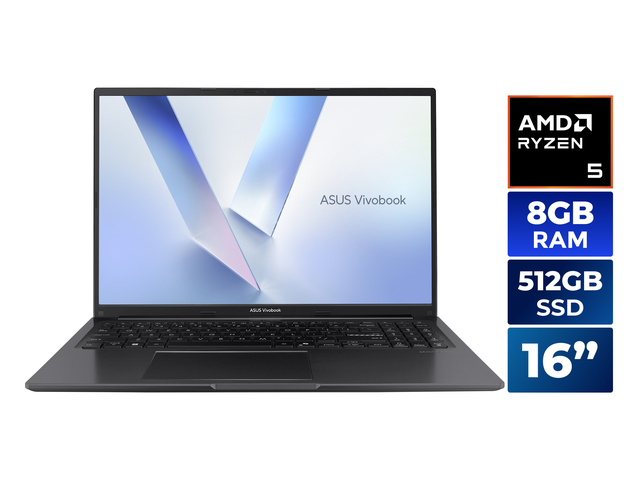
ASUS VivoBook 16 16.0" AMD Ryzen 5 150 8GB DDR5 Memory DDR5 4800 512GB NVMe SSD Windows 11 Home M1605NAQ-ES518GB Modern DDR5 Value Pick
Memory Config: 8GB DDR5 4800MHz (Upgradeable SODIMM)

ASUS VivoBook 16 16.0" AMD Ryzen 5 150 8GB DDR5 Memory DDR5 4800 512GB NVMe SSD Windows 11 Home M1605NAQ-ES51

RAM: 8 GBCPU: AMD Ryzen 5 150Storage: 512 GB NVMe SSDGPU: AMD Radeon Graphics (Integrated)

Target User Profile: Students, home office multitaskers, and budget shoppers who want a large 16-inch screen, fast modern Ryzen 5 processing, and 512GB NVMe SSD under $500.

✅ Confirmed Snappy Performance:
  • 15+ active Chrome/Edge tabs with YouTube & Spotify playing
  • Full Microsoft 365 (Word, Excel, PowerPoint) and Google Docs
  • Crisp Zoom & Microsoft Teams video calls with screen sharing
  • Casual games: League of Legends, Roblox, Minecraft at 60 FPS
  • Instant boot and app loading via PCIe NVMe SSD
⚠️ Workload Ceilings & Limits:
  • Will stutter if running 35+ tabs without tab sleeping enabled
  • Not suited for heavy modern AAA games (Cyberpunk, Warzone)
  • 4K video timeline rendering will take longer
Live Cross-Store Pricing Check:
Amazon
$449.99
Lowest Price
Newegg
$499.99

Upgradeability & Memory Path: Features accessible DDR5 SODIMM memory. You can purchase this $499 laptop today, and if you ever need 16GB later, you can pop in a second 8GB stick for $25–$35!

Value analysis: Proves you don't have to overpay: you get a powerful modern Ryzen processor and 512GB SSD under $500, with an easy upgrade path whenever your needs expand.
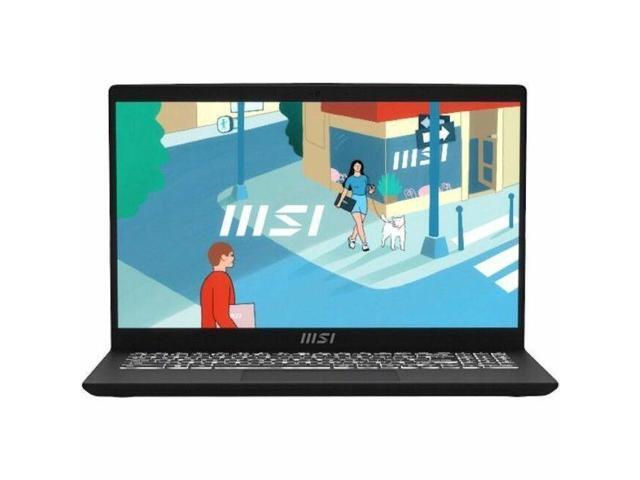
MSI Modern 15 15.6" Laptop - Intel Core i5-1334U - 16 GB - 512 GB SSD - Windows 11 Home (B13M-1097US)The 16GB Factory Step-Up ($100 Premium)
Memory Config: 16GB Dual-Channel RAM (Factory Installed)

MSI Modern 15 15.6" Laptop - Intel Core i5-1334U - 16 GB - 512 GB SSD - Windows 11 Home (B13M-1097US)

RAM: 16 GBCPU: Intel Core i5Storage: 512 GB SSDGPU: Intel Graphics (Integrated)

Target User Profile: Power office users, heavy research tab hoarders, and light creators who know they will consistently push beyond 25 tabs and don't want to open their laptop.

✅ Confirmed Snappy Performance:
  • 30+ persistent browser tabs without needing memory suspension
  • Large Excel workbooks with complex macros and formulas
  • Adobe Photoshop with multiple high-res layers and filters
  • Concurrent multi-app workflow: Slack + Teams + Zoom + Spotify + Chrome
  • Future-proofed for next 4–5 years without any DIY tinkering
⚠️ Workload Ceilings & Limits:
  • Costs roughly $100 more than 8GB models
  • Integrated Intel Iris graphics still limit heavy 3D gaming
Live Cross-Store Pricing Check:
Newegg
$599.00
Lowest Price
Amazon
$1,139.99

Upgradeability & Memory Path: Pre-configured with 16GB out of the box, eliminating the need to buy screwdrivers or secondary RAM sticks.

Value analysis: At under $600 with 16GB RAM and a 10-core Intel Core i5 processor, this is the most affordable way to get factory 16GB peace of mind without overpaying.

The 4 Golden Rules Before Buying an 8GB Laptop in 2026

  • 1. Check if the RAM is Upgradeable: If an 8GB Windows laptop has an open SODIMM slot, you have zero risk. You save $150–$250 today, and if you ever hit a memory bottleneck down the road, you can add an $28 8GB RAM stick yourself in 10 minutes. If it has soldered 8GB LPDDR5 with zero slots, only buy it if you know your workload will remain strictly everyday browsing and documents.
  • 2. Never Buy 8GB Paired with eMMC Storage: An 8GB laptop stays fast because modern NVMe SSDs swap memory at 3,500+ MB/s. If a cheap laptop pairs 8GB of RAM with slow eMMC flash storage (which only reads at 250 MB/s), running out of RAM will cause dreadful system freezing. Always verify the spec sheet says “NVMe M.2 SSD.”
  • 3. Turn on Browser Memory Saver: In Google Chrome (Settings → Performance) or Microsoft Edge (Settings → System and Performance), turn on “Memory Saver” or “Efficiency Mode.” This frees up memory from inactive background tabs and prevents memory bloat automatically.
  • 4. Don't Trade Away Screen or CPU Quality for RAM: You interact with your display and keyboard every second your laptop is open. Never buy an awful 720p washed-out TN display or a sluggish dual-core CPU just to get 16GB of RAM on a $400 budget. An 8GB laptop with a gorgeous 1080p IPS screen and a fast 6-core processor will provide an infinitely better daily experience!